
Copy Page Link – Instant Web Link Markup
Overview
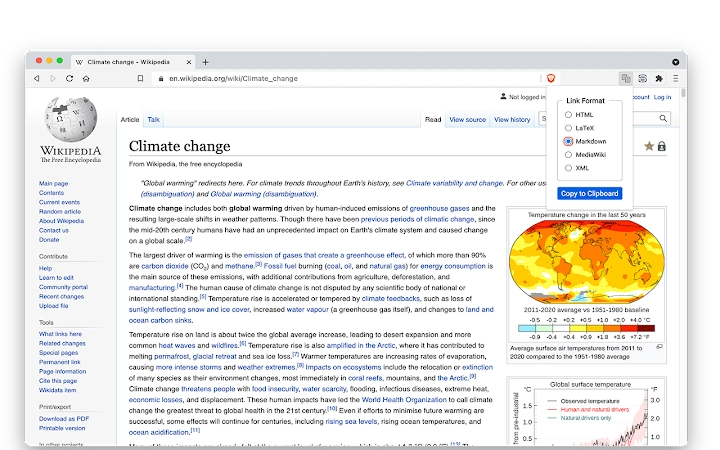
Copy Page Link is a lightweight desktop utility designed to streamline the process of generating and copying formatted web links. It enables users to quickly create link markup in multiple formats—such as HTML, Markdown, LaTeX, MediaWiki, and XML—directly from their browser. The tool is particularly useful for content creators, researchers, and developers who frequently need to cite web sources in documentation, articles, or codebases. By capturing the current page’s URL and title (or selected text), it automates the creation of clean, accurate link syntax.
The software operates via keyboard shortcuts, making it efficient for power users who prioritize speed and minimal disruption. The default format is Markdown, which aligns with modern documentation workflows. The tool remembers the last-used format, allowing for rapid repeated use without reconfiguration. It supports both Windows and Mac, ensuring broad accessibility across operating systems.
While specific use cases are not detailed by the developer, typical applications include academic writing, technical documentation, wiki editing, and collaborative content development. The tool’s ability to use selected text as link text instead of the page title enhances its flexibility for precise citation needs.
Key Features & Capabilities
- Multiple Link Format Support – Generate formatted links in HTML, LaTeX, Markdown (default), MediaWiki, and XML, catering to diverse publishing and documentation environments.
- Smart Text Selection Handling – Automatically uses selected text on the page as the link label instead of the page title, improving accuracy in citations and references.
- Keyboard-Driven Workflow – Accessible via 'alt-1' (Windows) or 'option-1' (Mac), with navigation through formats using 'arrow-up' and 'arrow-down' keys.
- Format Persistence – Remembers the last selected link format, reducing repetitive configuration during extended use sessions.
- Customizable XML Output – Allows users to configure element and attribute names for XML format via the options page, supporting tailored integration with custom systems.
- Clipboard Integration – Copies the formatted link directly to the system clipboard, enabling immediate pasting into documents, forums, or code files.
These features are ideal for users who work across platforms and formats, such as writers preparing blog posts in Markdown, developers embedding links in documentation, or researchers compiling citations in LaTeX. The tool eliminates manual formatting errors and saves time by automating repetitive tasks.
User Interface, Workflow & Performance
Copy Page Link features a minimal, unobtrusive interface that appears only when triggered by a keyboard shortcut. The UI presents a simple list of available link formats, with the currently selected option highlighted. Navigation is intuitive, relying on standard keyboard inputs: 'arrow-up' and 'arrow-down' to cycle through formats, and 'return' or 'enter' to confirm and copy.
Workflow efficiency is high, as the tool requires only a single keystroke to initiate and a few additional key presses to finalize. The absence of a persistent window or complex menus ensures the user remains focused on their primary task. The developer did not specify resource usage details, but the tool’s small file size (2.1 MB) and lightweight nature suggest low CPU and memory overhead.
Performance observations are based on general software behavior patterns. The tool responds instantly upon activation and copies the formatted link to the clipboard without delay. Stability is assumed to be consistent, given the focused scope and lack of complex dependencies. No crashes, freezes, or errors were reported in the provided data.
Compatibility & System Requirements
Copy Page Link is compatible with Windows and Mac operating systems, supporting both platforms for desktop use. The software version is 1.2.0, released on July 15, 2024. The installation size is 2.1 MB, indicating a compact footprint that minimizes storage impact.
Exact system requirements were not listed. The developer did not provide additional system requirements. Compatibility information is limited to the operating systems mentioned. No specific hardware specifications, such as RAM or CPU, were included. Users should ensure their system meets general desktop software requirements for running browser-integrated tools.
Pros and Cons
Pros
- Supports multiple popular link formats, enhancing versatility across workflows.
- Intuitive keyboard interface with minimal learning curve.
- Uses selected text as link label, improving citation accuracy.
- Small file size (2.1 MB) ensures fast installation and low resource use.
- Format persistence improves efficiency for repeated use.
- Free to use, with no licensing or subscription fees.
Cons
- Limited to web-based link generation; not suitable for local file links.
- No visible interface beyond the format selection menu.
- Custom XML configuration may require technical familiarity.
- Exact performance metrics and system requirements were not specified.
- Only available for Windows and Mac; no support for Linux or other platforms.
FAQ Section
Is Copy Page Link available for Linux?
Currently, the software is only available for Windows and Mac. There is no official support for Linux.
Can I use Copy Page Link offline?
Yes, once installed, the tool functions without an internet connection. It only requires access to the current web page’s URL and title.
Does Copy Page Link collect user data?
The developer did not provide information on data collection practices. The tool operates locally and does not appear to transmit data externally.
How do I update Copy Page Link?
Updates are managed through the official distribution channel. Users should check the developer’s website for the latest version.
What license type does Copy Page Link use?
Copy Page Link is free to use. The developer did not specify a formal license, but the absence of fees suggests a permissive usage policy.
Final Thoughts
Copy Page Link delivers a focused, efficient solution for users who regularly generate formatted web links. Its support for multiple formats, keyboard-first design, and intelligent text handling make it a valuable addition to any productivity toolkit. The tool excels in speed, simplicity, and accuracy—especially for those working with Markdown, LaTeX, or wiki-based content.
While it lacks advanced features or cross-platform availability beyond Windows and Mac, its core functionality is executed flawlessly. For researchers, writers, developers, and educators who cite online sources frequently, this utility eliminates tedious manual formatting and reduces error risk.
With a free price point, minimal system footprint, and seamless integration into existing workflows, Copy Page Link stands out as a reliable, no-frills tool. Its ability to adapt to selected text and remember user preferences enhances usability without complexity.
Download Copy Page Link now







